Exchange Server 2007 Mailbox Remove

Merhaba;

Exchange Server 2007 üzerinde bir posta kutusu (mailbox) sildiğimizde; bu işlem kalıcı olarak silmez posta kutusunu. Default olarak silinen posta kutusunu 30 gün içerisinde geri getirebiliriz. Tabi bu süreyi istediğimiz gibi değiştirebiliriz.

Start – All Programs – Microsoft Exchange Server 2007 – Exchange Management Console açıyoruz.

Server Configuration sekmesi altında Mailbox ‘ı seçiyoruz. Mailbox Database üzerinde saÄŸ tuÅŸ tıklıyoruz ve Properties seçeneÄŸini seçiyoruz.

MailboxDatabaseProperties

Limits sekmesi üzerinde; Keep deleted mailboxes for (days) seçeneÄŸinin yanında yazan 30 deÄŸeri; silinen postanın 30gün boyunca tutulacağı anlamına gelir. Tabi bu süreyi arttırmak veya azaltmak sizin elinizde. Yanlız ÅŸunu unutmamak lazım; bu yapacağımız ayarlar seçtiÄŸimiz database içindeki tüm postalara etki eder. Ama Exchange ‘in önceki sürümlerine bakarsak; bu iÅŸlem her mailbox için ayrı ayrı ayarlanabiliyordu. Bu sürümde böyle bir uygulama yoktur:) Do not permanently delete items until the database has been backed up seçeneÄŸini iÅŸaretlersek;hiçbir mailbox yedekleme yapılmadığı sürece kalıcı olarak silinmez olur.

Recipient Configuration başlığı altında Mailbox içinden geri getirmek istediğiniz kullanıcıyı siliyoruz.

MicrosoftExchange YESNO

Gelen uyarı ekranın YES butonuna tıklıyoruz. Silme iÅŸlemi gerçekleÅŸmiÅŸtir ancak 30 gün içerisinde geri kurtarabiliriz. Kurtarma iÅŸlemi için ilk olarak Active Directory Users And Computers içinde bir user oluÅŸturuyoruz. Herhangibi bir isimle oluÅŸturabilirsiniz. Exchange management Console üzerinden Disconnected Mailbox ekranına geçtiÄŸimizde silinmiÅŸ mailbox ‘ların listelerini görürüz.

Sildiğimiz kullanıcı üzerinde sağ tuş tıklıyoruz ve Connect seçeneğine giriyoruz.
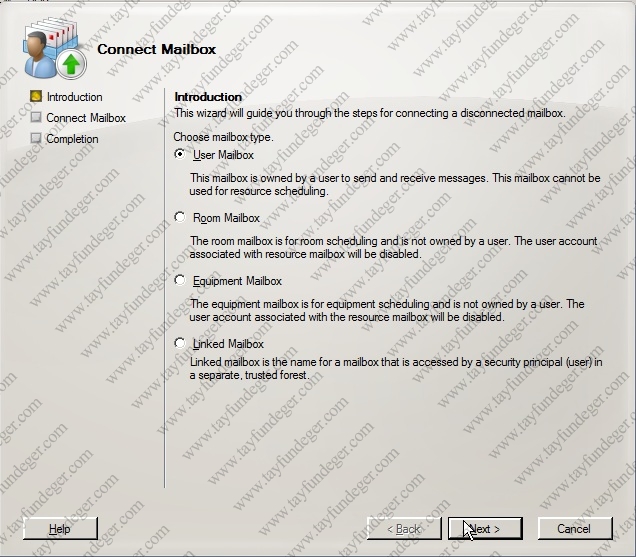
connectmailbox

İlk ekranı Next butonu ile geçiyoruz.

ExistingUser

Existing user seçeneÄŸini kullanarak, Browse tuÅŸunu kullanarak Active Directory ‘de oluÅŸturduÄŸumuz kullanıcıyı seçiyoruz.Next ile devam ediyoruz ve Finish ile mailbox ‘ları baÄŸlıyoruz. Tabi enbaÅŸta remove yerine eÄŸer disable yapsaydık Matching User seçeneÄŸini kullanıp sildiÄŸimiz kullanıcıyı seçicektik.Ayrıca eÄŸer posta kutusu içinden mail ‘ler silindiyse bunun içinde Outlook programı içindeki Tools bölümünden Recover Selected Items seçeneÄŸini kullanırız.

Bir başka makalede görüşmek üzere..

http://www.tayfundeger.com/wp-content/plugins/sociofluid/images/digg_48.png http://www.tayfundeger.com/wp-content/plugins/sociofluid/images/reddit_48.png http://www.tayfundeger.com/wp-content/plugins/sociofluid/images/dzone_48.png http://www.tayfundeger.com/wp-content/plugins/sociofluid/images/stumbleupon_48.png http://www.tayfundeger.com/wp-content/plugins/sociofluid/images/delicious_48.png http://www.tayfundeger.com/wp-content/plugins/sociofluid/images/blinklist_48.png http://www.tayfundeger.com/wp-content/plugins/sociofluid/images/blogmarks_48.png http://www.tayfundeger.com/wp-content/plugins/sociofluid/images/furl_48.png http://www.tayfundeger.com/wp-content/plugins/sociofluid/images/newsvine_48.png http://www.tayfundeger.com/wp-content/plugins/sociofluid/images/technorati_48.png http://www.tayfundeger.com/wp-content/plugins/sociofluid/images/magnolia_48.png http://www.tayfundeger.com/wp-content/plugins/sociofluid/images/google_48.png http://www.tayfundeger.com/wp-content/plugins/sociofluid/images/myspace_48.png http://www.tayfundeger.com/wp-content/plugins/sociofluid/images/facebook_48.png http://www.tayfundeger.com/wp-content/plugins/sociofluid/images/yahoobuzz_48.png http://www.tayfundeger.com/wp-content/plugins/sociofluid/images/sphinn_48.png http://www.tayfundeger.com/wp-content/plugins/sociofluid/images/mixx_48.png http://www.tayfundeger.com/wp-content/plugins/sociofluid/images/twitter_48.png http://www.tayfundeger.com/wp-content/plugins/sociofluid/images/jamespot_48.png http://www.tayfundeger.com/wp-content/plugins/sociofluid/images/meneame_48.png

0 Responses to “Exchange Server 2007 Mailbox Remove”


Comments are currently closed.


Get Adobe Flash playerPlugin by wpburn.com wordpress themes
Valid XHTML 1.0 Transitional Valid CSS! Creative Commons License
Tayfun DEGER - Cozumpark.Com by Tayfun DEGER is licensed under a Creative Commons Attribution-No Derivative Works 3.0 Unported License.
Based on a work at creativecommons.org.
Permissions beyond the scope of this license may be available at http://www.tayfundeger.com.

Hd izle asp.net c# Rc araç ilanlari