Exchange Management Shell ve Windows Powershell

Merhaba;

Exchange Server 2007 ‘nin 2 adet yönetim konsolu vardır. Bu konsollar sadece Exchange Server 2007 ile kullanılır. Bundan önceki Exchange sürümlerinde bulunmamaktadır. Exchange Management Shell ile yaptığımız her iÅŸi Exchange Management Console ile  de gerçekleÅŸtirebiliriz.

Start – All Programs – Microsoft Exchange Server 2007 – Exchange Management Shell seçiyoruz.
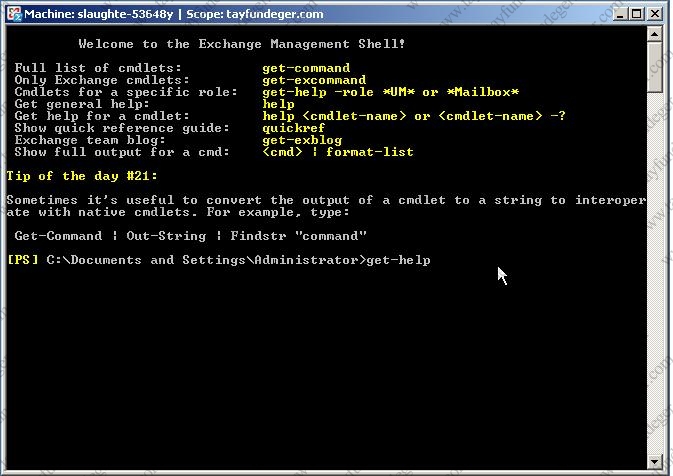
get-help

Karşımıza açılan komut satırına get-help yazıyoruz. Bu komut konsolun kulanımı ile ilgili bilgi veriyor.

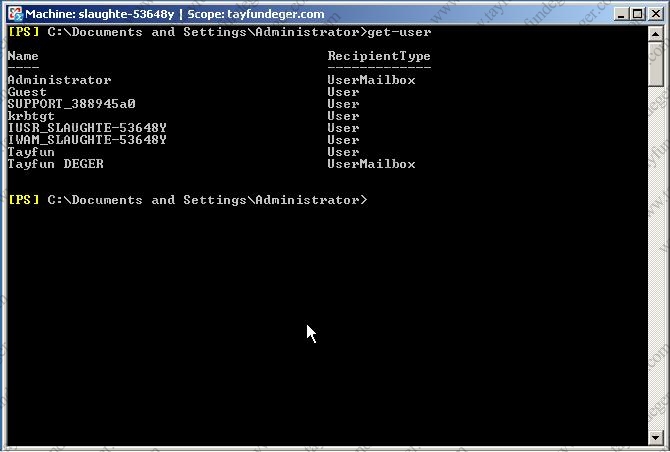
get-user

Get-user yazıyoruz Enter ‘a bastığımızda kullanıcıların isimleri ve yetkileri karşımıza geliyor.
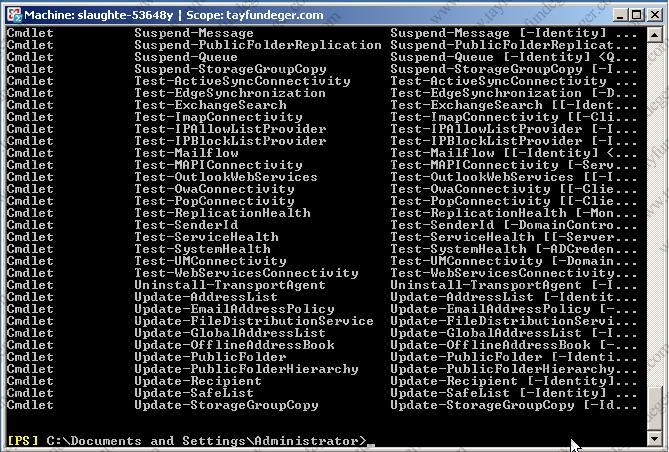
get-excommand

Get-excommand komutu ile, bu konsolda kullanabilceğimiz bütün komutlar listelenir. Bu listede ki herhangibi bir komu hakkında bilgi almak istersek get-help komutun_adı yazıyoruz.

Ekranı temizlemek için cls veya clear kullanılır.

get-user-sort-object

get-user | sort-object name komutu ile kullanıcıları isme göre sıralanmış bir şekilde karşımızda buluruz.

ÖrneÄŸin; ” get-distributiongroupmember IT|set-mailbox-MaxReceiveSize 2048000 “yazıyoruz. Bu komut ile IT grubunda ki bütün mailbox ‘lara 2MB sınır koyuyoruz.

get-user | where-object {$_.name -like “t*”} komutu ile sadece T harfi ile baÅŸlayan isimler listelenir.

Bir başka makalede görüşmek üzere..

http://www.tayfundeger.com/wp-content/plugins/sociofluid/images/digg_48.png http://www.tayfundeger.com/wp-content/plugins/sociofluid/images/reddit_48.png http://www.tayfundeger.com/wp-content/plugins/sociofluid/images/dzone_48.png http://www.tayfundeger.com/wp-content/plugins/sociofluid/images/stumbleupon_48.png http://www.tayfundeger.com/wp-content/plugins/sociofluid/images/delicious_48.png http://www.tayfundeger.com/wp-content/plugins/sociofluid/images/blinklist_48.png http://www.tayfundeger.com/wp-content/plugins/sociofluid/images/blogmarks_48.png http://www.tayfundeger.com/wp-content/plugins/sociofluid/images/furl_48.png http://www.tayfundeger.com/wp-content/plugins/sociofluid/images/newsvine_48.png http://www.tayfundeger.com/wp-content/plugins/sociofluid/images/technorati_48.png http://www.tayfundeger.com/wp-content/plugins/sociofluid/images/magnolia_48.png http://www.tayfundeger.com/wp-content/plugins/sociofluid/images/google_48.png http://www.tayfundeger.com/wp-content/plugins/sociofluid/images/myspace_48.png http://www.tayfundeger.com/wp-content/plugins/sociofluid/images/facebook_48.png http://www.tayfundeger.com/wp-content/plugins/sociofluid/images/yahoobuzz_48.png http://www.tayfundeger.com/wp-content/plugins/sociofluid/images/sphinn_48.png http://www.tayfundeger.com/wp-content/plugins/sociofluid/images/mixx_48.png http://www.tayfundeger.com/wp-content/plugins/sociofluid/images/twitter_48.png http://www.tayfundeger.com/wp-content/plugins/sociofluid/images/jamespot_48.png http://www.tayfundeger.com/wp-content/plugins/sociofluid/images/meneame_48.png

0 Responses to “Exchange Management Shell ve Windows Powershell”


Comments are currently closed.


Get Adobe Flash playerPlugin by wpburn.com wordpress themes
Valid XHTML 1.0 Transitional Valid CSS! Creative Commons License
Tayfun DEGER - Cozumpark.Com by Tayfun DEGER is licensed under a Creative Commons Attribution-No Derivative Works 3.0 Unported License.
Based on a work at creativecommons.org.
Permissions beyond the scope of this license may be available at http://www.tayfundeger.com.

Hd izle asp.net c# Rc araç ilanlari